تاریخچه کامپیوتر
» رایانه
رایانه، یا کامپیوتر ماشینی است که برای پردازش اطلاعات استفاده میشود.
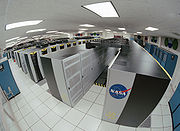
ابررایانهٔ کلمبیا در مرکز تحقیقات آمِس، ناسا
» مقدمه
در تاریخ بشر مثال های مکانیکی زیادی برای کامپیوتر ها وجود دارد ، اولین کامپیوتر های الکترونیکی در اواسط قرن بیستم بین سالهای (1940-1945) ساخته شدند . اندازه آنها بسیار بزرگ و به اندازه اتاق های بزرگ بودند و به اندازه صدها کامپیوتر امروزی برق مصرف می کردند. کامپیوتر های امروزی بر پایه مدارهای مجتمع پایه ریزی شده اند و میلیونها بار از کامپیوترهای اولیه سریعتر و کارآمدتر هستند و فضای بسیار کمی را نسبت به آنها اشغال می کنند . قابلیت ذخیره و بکارگیری عملی لیستی از برنامه ها (Programs) کامپیوترها را نسبت به ماشین حساب ها هوشمندتر ساخته است.
» تاریخچه محاسبه
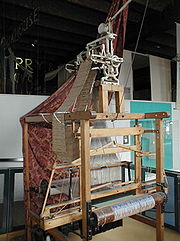
دستگاه بافندگی تصاویر بر روی پارچه ، که در موزه علوم و صنعت در منچستر انگلستان موجود است ،از اولین دستگاههای قابل برنامه ریزی است .
اولین استفاده از واژه کامپیوتر در سال 1316 ثبت گردید و به شخصی گفته می شد که محاسبات را انجام می داد ، و استفاده از این لغت ادامه پیدا کرد تا اواسط قرن بیستم و تا آن زمان گسترش یافت به ماشینی که محاسبات را انجام می دهد.
تاریخچه کامپیوترهای مدرن با 2تکنولوژی مجزا آغاز گردید یکی محاسبات اتوماتیک و دیگری قابلیت برنامه پذیری . نمونه اولیه از دستگاههای محاسبه مکانیکی , چرتکه ها هستند .خط کش های مهندسی و استرلاب و مکانیزم آنتیکثرا(که از 100-150 قبل از میلاد را تاریخ نگاری کرد)، و سیستم تئاتر الکساندارا که با کمک مکانیزم های اتوماتیک طنابی تا حدود 10 دقیقه با طبل نمایش می داد ، جوهره اصلی برنامه ریزی و محاسبات بودند.
ساعت کاخ(castle clock) یک ساعت نجومی بود که توسط "الجزیری" در سال 1206 اختراع گردید و به عنوان اولین کامپیوتر قابل برنامه ریزی آنالوگ شناخته شده است.این ساعت زودیاک(منطقه البروج) را نمایش می دهد ،مدارهای شمسی و قمری ،یک نشانگر هلال ماهی شکل از یک دروازه عبور می کند و باعث می شود درها به صورت اتوماتیک راس ساعت باز شوند و صدای زنگ به گوش برسد.
مخترع کامپیوترهایی که با برنامه کنترل می شدند "کنراد زئوس"( Konrad Zuse) است،که اولین کامپیوتر را در سال 1941 و دومی را بر پایه حافظه مغناطیسی در سال 1955 ساخت.
جورج استایبایتز(George Stibitz) به صورت بین المللی پدر کامپیوترهای دیجیتال است.زمانی که در نوومبر سال 1937در آزمایشگاه بل کار می کرد ,جورج یک ماشین حساب بر پایه یک رله داخلی را اختراع کرد که مدل K "kitchen table" نام گرفت،که اولین ماشینی بود که از مدارات بایناری برای انجام محاسبات عملی ریاضی استفاده می کرد. مدل هایی که بعد از آن ابداع شدند با مهارت فرمولهای پیشرفته ریاضی را در خود جای دادند.
» طراحی CPU و واحد کنترل
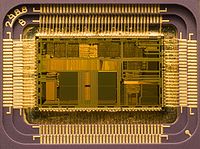
برشی از میکروپروسسور اینتل مدل 80486DX2 در اندازه واقعی 12*6.75 میلی متر
واحد کنترل (اغلب سیستم کنترل نامیده می شود یا کنترل مرکزی) بخش های مختلف کامپیوتر را مدیریت می نماید. این بخش دستورالعمل های برنامه را می خواند و مدیریت می کند ، و با تغییر آنها به یک سری سیگنالهای کنترل می تواند بخش های دیگر کامپیوتر را فعال یا غیر فعال نماید. بخش کنترل در کامپیوترهای پیشرفته می تواند دستورات را تغییر دهد در جهت بهبود کارآیی . یک بخش کلیدی در تمام CPU ها بخش شمارندهء برنامه است ،یک سلول حافظه مخصوص(Register) که نشان می دهد حافظهء بعدی که باید خوانده شود کدام است.
عملکرد سیستم های کنترلی به ترتیب زیر است ، و برخی از این گامها ممکن است با هم انجام گیرد یا با دستورات متفاوت انجام شوند که این مورد وابسته به نوع CPU می باشد.
1. خواندن کد برای عملکرد بعدی از بخش شمارنده
2. دیکود کردن کدهای عددی(بایناری یا هگز)به یک سری سیگنال برای دیگر سیستم ها
3. بالارفتن شماره کانتر برای دریافت دستور بعدی
4. خواندن این موضوع که آیا اطلاعات یا دستورالعمل باید از حافظه(یا یک دستگاه ورودی) خوانده شود ، و اینکه محل دیتای مورد نیاز کجا است.
5. تامین دیتای مورد نیاز برای یک ALU یا ریجیستر
6. اگر دستورالعمل به یک ALU یا یک سخت افزار نیاز دارد برای کامل شدن،به سخت افزار دستور بده تا عملکردهای مورد نظر انجام شوند.
7. نتایج را از ALU به حافظه یا ریجیستری برگردان و در یک دستگاه خروجی مثل مانیتور ثبت کن.
8. به مرحله اول برگرد
از آنجا که کانتر برنامه به صورت فکری فقط خانه بعدی حافظه را می خواند ،می توان از طریق محاسبات ALU آن را تغییر داد. به این طریق که 100 را به شمارنده برنامه می دهیم و باعث می شود که دستور بعدی از خانه 100 خوانده شود. عملکردهایی که شمارنده برنامه را تحت تاثیر قرار می دهند جامپ ها"jumps" نامیده می شوند و تکرار را ممکن می سازند و به کامپیوتر توان تکرار یک برنامه را می دهند که به آنها دستورات شرطی گفته می شود.
» واحد محاسبه و منطق
واحد ALU قادر است2 نوع عملکرد انجام دهد محاسباتی و منطقی.
بخش محاسباتی ALU محدود است به اعمال جمع و تفریق یا ضرب یا تقسیم و در کل مثلثات(سینوس،کسینوس و ...) . ALU می تواند روی تمامی اعداد صحیح کار کند و برای انجام عملکردهای پیچیده به زمان بیشتری نیاز دارد. یک ALU همچنین می تواند اعداد را با هم مقایسه نماید و اندازه صحیح را بازگرداند(true or false) بسته به اینکه بزرگتر است یا کوچکتر است یا مساوی ، به صورت مثال: آیا 64 بزرگتر از 65 است ؟ غلط(false)
اعمال منطقی : و ,یا,آیا,نیست (AND, OR, XOR and NOT). اینها می توانند مفید باشند برای استفاده در بخش منطق سیستم و برای محاسبات سخت و پیشرفته منطق بولین .
کامپیوتر های سوپر اسکالر چندALU دارند و می توانند چندین دستورالعمل را در یک زمان انجام دهند. پردازنده های گرافیکی و کامپیوتر ها با قابلیت های SIMD و MIMD دارای ALUهایی هستند که محاسبات پیچیدهء برداری و ماتریسی انجام می دهند.
» حافظه ها
در سال 1960 حافظهء اولیه مغناطیسی ابداء گردید ، تا زمانی که توسط حافظه های نیمه هادی جایگزین گردید. یک حافظهء کامپیوتر را می توان به صورت لیستی از سلولهای کنار هم دید که اعداد می توانند قرار بگیرند یا خوانده شوند ، هر سلول یک شماره مختص خود را دارد که آدرس نامیده می شود و می تواند یک عدد را در خود جای دهد. کامپیوتر می تواند به این صورت عمل کند که "عدد 123 را در خانه شماره 1357 قرار بده" یا "خانه شماره 1357 را با خانه شماره 2468 جمع کن و پاسخ را در خانه شماره 1595 قرار بده". اعداد ،الفباء و حتی دستورالعمل های کامپیوتر می توانند به راحتی در حافظه قرار بگیرند.از آنجا که CPU بین انواع مختلف اطلاعات تفاوت نمی گذارد ، این پاسخگویی نرم افزار است که به ما نشان می دهد در این خانه از حافظه چه چیزی ذخیره شده است.
در تمامی کامپیوتر های مدرن، هر خانه از حافظه به صورت بایناری ذخیره می شود و به صورت گروه های 8 تایی دسته بندی می شود که یک بایت نامیده می شود. هر بایت می تواند 256 عدد مختلف را بسازد (2^8 = 256) و می تواند به صورت 0 تا 255 یا از -128 تا +128 قرار بگیرد. برای اعداد بزرگتر از چندین بایت پشت سر هم استفاده می شود البته به صورت (2,4,8).وقتی که به اعداد منفی نیاز داریم معمولا با یک مکمل ذخیره می شوند. یک کامپیوتر می تواند هر نوعی از اطلاعات را در حافظه ذخیره نماید البته اگر به اعداد بایناری تبدیل شوند. کامپیوترهای پیشرفته بیلیون ها یا حتی تریلیون ها بایت از اطلاعات دارند.
CPU بخش مخصوصی از حافظه(Register) را در خود دارد که بسیار سریعتر از حافظه های معمولی می توانند نوشته و خوانده شوند. آنها بسته به نوع CPU می توانند از چند تا چند صد تا در داخل یک CPU باشند. آنها برای دسترسی سریع CPU در نظر گرفته شده اند تا CPU کامپیوتر کارآیی بالاتری داشته باشد و بخش ALU محاسبات را سریعتر انجام دهد.
حافظه های اصلی کامپیوتر به 2 بخش کلی تقسیم می شوند 1- حافظه هایی با دسترسی تصادفی (RAM) و2- حافظه های فقط قابل خواندن(ROM) .
RAM می تواند در هر زمان که CPU دستور دهد نوشته و خوانده شود اما ROM ها از اطلاعات و نرم افزار های از قبل بارگیری شده پر شده اند و هیچ گاه قابل تغییر نیستند، بنابراین CPU فقط می تواند فقط از آن بخواند. ROM معمولا برای دستورالعمل هایی استفاده می شوند که کامپیوتر برای بالا آمدن از آنها استفاده می نماید. زمانی که کامپیوتر را خاموش می کنیم اطلاعات RAM پاک می شوند ولی اطلاعات ROM باقی می مانند.در یک کامپیوتر شخصی ROM شامل برنامه های مخصوص است که BIOS نامیده می شود که وظیفه دارد اطلاعات اولیه سیستم را بارگیری نماید و سیستم عامل را از روی هارد دیسک به رم بارگیری نماید هر زمان که کامپیوتر روشن یا ریست می شود.
در کامپیوترهای فشرده که دیسک درایو ندارند تمام اطلاعات در ROM ذخیره شده است. نرم افزاری که در ROM قرار دارد معمولا firmware نامیده می شود زیرا بیشتر شبیه به سخت افزار است تا نرم افزار. بلورهای فلش مموری تمایز بین ROM و RAM است ، وقتی که خاموش می شود اطلاعات آن باقی می ماند اما باز هم می توان روی آن نوشت. در نوع خود کندتر از ROM و ROM است اما در مواردی که سرعت زیاد نیاز نیست بسیار مفید است.
در اغلب کامپیوتر های پیشرفته تعداد بیشتری رم وجود دارند که از ریجیسترها کندتر و از حافظه های اصلی سریعتر هستند.
» ورودی و خروجی ها
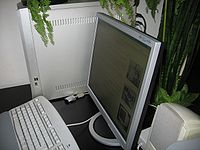
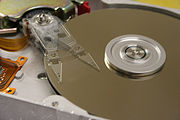
هارد دیسک ها حافظه های عمومی هستند که در کامپیوترها استفاده می شوند. I/Oبه این معنی است که کامپیوتر چگونه با دنیای اطراف خود تبادل اطلاعات می نماید . دستگاههایی که ورودی و خروجی کامپیوتر را تامین می کنند دستگاههای جانبی نامیده می شوند. در یک کامپیوتر شخصی(PC)دستگاههای جانبی شامل ورودی ها هستند از قبیل : کیبرد و موس و دستگاههای خروجی از قبیل مانیتور و پرینتر .
هارد دیسک ها،فلاپی درایو ها و دیسک های نوری هم به عنوان ورودی و هم به عنوان خروجی به حساب می آیند. شبکه های کامپیوتری نیز از انواع دیگر ورودی و خروجی ها هستند.
اغلب دستگاههای جانبی ، خود کامپیوترهای پیچیده ای هستند که در داخل خودشان CPU و حافظه دارند. یک واحد پردازش تصویر (GPU) ممکن است از 50 یا تعداد بیشتری کامپیوتر کوچک تشکیل شده باشد که محاسبات سنگین سه بعدی لازم جهت نمایش تصویرهای سنگین گرافیکی را انجام می دهد. کامپیوترهای مدرن خانگی شامل کامپیوترهای داخلی زیادی می شوند که به CPU اصلی کمک می کنند تا ورودی و خروجی را بهتر اداره نماید.
منبع: سایت علمی ویکیپدیا
Computer
A computer is a machine that manipulates data according to a set of instructions.
The Columbia Supercomputer, located at the NASA Ames Research Center.
Although mechanical examples of computers have existed through much of recorded human history, the first electronic computers were developed in the mid-20th century (1940–1945). These were the size of a large room, consuming as much power as several hundred modern personal computers (PCs). Modern computers based on integrated circuits are millions to billions of times more capable than the early machines, and occupy a fraction of the space.Simple computers are small enough to fit into a wristwatch, and can be powered by a watch battery. Personal computers in their various forms are icons of the Information Age and are what most people think of as "computers". The embedded computers found in many devices from MP3 players to fighter aircraft and from toys to industrial robots are however the most numerous.
The ability to store and execute lists of instructions called programs makes computers extremely versatile, distinguishing them from calculators. The Church–Turing thesis is a mathematical statement of this versatility: any computer with a certain minimum capability is, in principle, capable of performing the same tasks that any other computer can perform. Therefore computers ranging from a mobile phone to a supercomputer are all able to perform the same computational tasks, given enough time and storage capacity.
History of computing
The Jacquard loom, on display at the Museum of Science and Industry in Manchester, England, was one of the first programmable devices.The first use of the word "computer" was recorded in 1613, referring to a person who carried out calculations, or computations, and the word continued to be used in that sense until the middle of the 20th century. From the end of the 19th century onwards though, the word began to take on its more familiar meaning, describing a machine that carries out computations.
The history of the modern computer begins with two separate technologies—automated calculation and programmability—but no single device can be identified as the earliest computer, partly because of the inconsistent application of that term. Examples of early mechanical calculating devices include the abacus, the slide rule and arguably the astrolabe and the Antikythera mechanism (which dates from about 150–100 BC). Hero of Alexandria (c. 10–70 AD) built a mechanical theater which performed a play lasting 10 minutes and was operated by a complex system of ropes and drums that might be considered to be a means of deciding which parts of the mechanism performed which actions and when.This is the essence of programmability.
The "castle clock", an astronomical clock invented by Al-Jazari in 1206, is considered to be the earliest programmable analog computer.It displayed the zodiac, the solar and lunar orbits, a crescent moon-shaped pointer travelling across a gateway causing automatic doors to open every hour,and five robotic musicians who played music when struck by levers operated by a camshaft attached to a water wheel. The length of day and night could be re-programmed to compensate for the changing lengths of day and night throughout the year.
The Renaissance saw a re-invigoration of European mathematics and engineering. Wilhelm Schickard's 1623 device was the first of a number of mechanical calculators constructed by European engineers, but none fit the modern definition of a computer, because they could not be programmed.
In 1801, Joseph Marie Jacquard made an improvement to the textile loom by introducing a series of punched paper cards as a template which allowed his loom to weave intricate patterns automatically. The resulting Jacquard loom was an important step in the development of computers because the use of punched cards to define woven patterns can be viewed as an early, albeit limited, form of programmability.
It was the fusion of automatic calculation with programmability that produced the first recognizable computers. In 1837, Charles Babbage was the first to conceptualize and design a fully programmable mechanical computer, his analytical engine.Limited finances and Babbage's inability to resist tinkering with the design meant that the device was never completed.
In the late 1880s, Herman Hollerith invented the recording of data on a machine readable medium. Prior uses of machine readable media, above, had been for control, not data. "After some initial trials with paper tape, he settled on punched cards ..." To process these punched cards he invented the tabulator, and the keypunch machines. These three inventions were the foundation of the modern information processing industry. Large-scale automated data processing of punched cards was performed for the 1890 United States Census by Hollerith's company, which later became the core of IBM. By the end of the 19th century a number of technologies that would later prove useful in the realization of practical computers had begun to appear: the punched card, Boolean algebra, the vacuum tube (thermionic valve) and the teleprinter.
During the first half of the 20th century, many scientific computing needs were met by increasingly sophisticated analog computers, which used a direct mechanical or electrical model of the problem as a basis for computation. However, these were not programmable and generally lacked the versatility and accuracy of modern digital computers.
Alan Turing is widely regarded to be the father of modern computer science. In 1936 Turing provided an influential formalisation of the concept of the algorithm and computation with the Turing machine. Of his role in the modern computer, Time magazine in naming Turing one of the 100 most influential people of the 20th century, states: "The fact remains that everyone who taps at a keyboard, opening a spreadsheet or a word-processing program, is working on an incarnation of a Turing machine".
The inventor of the program-controlled computer was Konrad Zuse, who built the first working computer in 1941 and later in 1955 the first computer based on magnetic storage.
George Stibitz is internationally recognized as a father of the modern digital computer. While working at Bell Labs in November 1937, Stibitz invented and built a relay-based calculator he dubbed the "Model K" (for "kitchen table", on which he had assembled it), which was the first to use binary circuits to perform an arithmetic operation. Later models added greater sophistication including complex arithmetic and programmability.
CPU design and Control unit
Die of an Intel 80486DX2 microprocessor (actual size: 12×6.75 mm) in its packaging.
Diagram showing how a particular MIPS architecture instruction would be decoded by the control system.The control unit (often called a control system or central controller) manages the computer's various components; it reads and interprets (decodes) the program instructions, transforming them into a series of control signals which activate other parts of the computer.Control systems in advanced computers may change the order of some instructions so as to improve performance.
A key component common to all CPUs is the program counter, a special memory cell (a register) that keeps track of which location in memory the next instruction is to be read from.
The control system's function is as follows—note that this is a simplified description, and some of these steps may be performed concurrently or in a different order depending on the type of CPU:
1.Read the code for the next instruction from the cell indicated by the program counter.
2.Decode the numerical code for the instruction into a set of commands or signals for each of the other systems.
3.Increment the program counter so it points to the next instruction.
4.Read whatever data the instruction requires from cells in memory (or perhaps from an input device). The location of this required data is typically stored within the instruction code.
5.Provide the necessary data to an ALU or register.
6.If the instruction requires an ALU or specialized hardware to complete, instruct the hardware to perform the requested operation.
7.Write the result from the ALU back to a memory location or to a register or perhaps an output device.
8.Jump back to step.
Since the program counter is (conceptually) just another set of memory cells, it can be changed by calculations done in the ALU. Adding 100 to the program counter would cause the next instruction to be read from a place 100 locations further down the program. Instructions that modify the program counter are often known as "jumps" and allow for loops (instructions that are repeated by the computer) and often conditional instruction execution (both examples of control flow).
It is noticeable that the sequence of operations that the control unit goes through to process an instruction is in itself like a short computer program—and indeed, in some more complex CPU designs, there is another yet smaller computer called a microsequencer that runs a microcode program that causes all of these events to happen.
Arithmetic / logic unit (ALU)
The ALU is capable of performing two classes of operations: arithmetic and logic.
The set of arithmetic operations that a particular ALU supports may be limited to adding and subtracting or might include multiplying or dividing, trigonometry functions (sine, cosine, etc) and square roots. Some can only operate on whole numbers (integers) whilst others use floating point to represent real numbers—albeit with limited precision. However, any computer that is capable of performing just the simplest operations can be programmed to break down the more complex operations into simple steps that it can perform. Therefore, any computer can be programmed to perform any arithmetic operation—although it will take more time to do so if its ALU does not directly support the operation. An ALU may also compare numbers and return boolean truth values (true or false) depending on whether one is equal to, greater than or less than the other ("is 64 greater than 65?").
Logic operations involve Boolean logic: AND, OR, XOR and NOT. These can be useful both for creating complicated conditional statements and processing boolean logic.
Superscalar computers may contain multiple ALUs so that they can process several instructions at the same time.Graphics processors and computers with SIMD and MIMD features often provide ALUs that can perform arithmetic on vectors and matrices.
Memory and Computer data storage
Magnetic core memory was the computer memory of choice throughout the 1960s, until it was replaced by semiconductor memory.A computer's memory can be viewed as a list of cells into which numbers can be placed or read. Each cell has a numbered "address" and can store a single number. The computer can be instructed to "put the number 123 into the cell numbered 1357" or to "add the number that is in cell 1357 to the number that is in cell 2468 and put the answer into cell 1595". The information stored in memory may represent practically anything. Letters, numbers, even computer instructions can be placed into memory with equal ease. Since the CPU does not differentiate between different types of information, it is the software's responsibility to give significance to what the memory sees as nothing but a series of numbers.
In almost all modern computers, each memory cell is set up to store binary numbers in groups of eight bits (called a byte). Each byte is able to represent 256 different numbers (2^8 = 256); either from 0 to 255 or -128 to +127. To store larger numbers, several consecutive bytes may be used (typically, two, four or eight). When negative numbers are required, they are usually stored in two's complement notation. Other arrangements are possible, but are usually not seen outside of specialized applications or historical contexts. A computer can store any kind of information in memory if it can be represented numerically. Modern computers have billions or even trillions of bytes of memory.
The CPU contains a special set of memory cells called registers that can be read and written to much more rapidly than the main memory area. There are typically between two and one hundred registers depending on the type of CPU. Registers are used for the most frequently needed data items to avoid having to access main memory every time data is needed. As data is constantly being worked on, reducing the need to access main memory (which is often slow compared to the ALU and control units) greatly increases the computer's speed.
Computer main memory comes in two principal varieties: random-access memory or RAM and read-only memory or ROM. RAM can be read and written to anytime the CPU commands it, but ROM is pre-loaded with data and software that never changes, so the CPU can only read from it. ROM is typically used to store the computer's initial start-up instructions. In general, the contents of RAM are erased when the power to the computer is turned off, but ROM retains its data indefinitely. In a PC, the ROM contains a specialized program called the BIOS that orchestrates loading the computer's operating system from the hard disk drive into RAM whenever the computer is turned on or reset. In embedded computers, which frequently do not have disk drives, all of the required software may be stored in ROM. Software stored in ROM is often called firmware, because it is notionally more like hardware than software. Flash memory blurs the distinction between ROM and RAM, as it retains its data when turned off but is also rewritable. It is typically much slower than conventional ROM and RAM however, so its use is restricted to applications where high speed is unnecessary.
In more sophisticated computers there may be one or more RAM cache memories which are slower than registers but faster than main memory. Generally computers with this sort of cache are designed to move frequently needed data into the cache automatically, often without the need for any intervention on the programmer's part.
Input/output (I/O)
Hard disk drives are common storage devices used with computers.I/O is the means by which a computer exchanges information with the outside world. Devices that provide input or output to the computer are called peripherals.On a typical personal computer, peripherals include input devices like the keyboard and mouse, and output devices such as the display and printer. Hard disk drives, floppy disk drives and optical disc drives serve as both input and output devices. Computer networking is another form of I/O.
Often, I/O devices are complex computers in their own right with their own CPU and memory. A graphics processing unit might contain fifty or more tiny computers that perform the calculations necessary to display 3D graphics[citation needed]. Modern desktop computers contain many smaller computers that assist the main CPU in performing I/O.

برای دریافت مقاله به صورت فایل زیپ روی لینک بالا کلیک کنید.